Network Access Control by User Group
The Problem: One-Size-Fits-All Network Access
Your organization has departments with different security requirements. Sales should access client CRMs. Accounting should access financial systems. IT should access everything—or nothing, depending on your policy.
With traditional VDI, you apply policies per machine or per role. With abcdesktop on Kubernetes, you can apply policies directly per LDAP group, tied to the user pod itself.
How It Works
-
User Groups → Pod Labels
LDAP groups automatically become Kubernetes pod labels.shipcrew=true,adminstaff=true, etc. -
DNS + FQDN Filtering
Cilium allows*.facebook.compatterns, not just IPs. Maintenance is automatic. -
Default-Deny Posture
All egress is blocked until explicitly allowed. No data leakage by accident. -
Zero Client Config
Rules are applied on the server side. User has no way to bypass them. -
Dynamic Scaling
Add a user to a group → pod gets labeled → policies apply automatically. -
LDAP/AD/OAuth Ready
Works with any auth provider that supports groups.
Architecture Overview
When a user logs in, here's what happens:
- Authentication — User provides credentials (LDAP, AD, OAuth)
- Group Resolution — System reads user's group memberships
- Pod Creation — Desktop pod is created with group labels automatically applied
- Policy Enforcement — Cilium reads the labels and applies network rules
---
config:
  theme: redux-color
---
sequenceDiagram
    actor Philip
    Philip->>Router: Logme in (Philip, password)
    Router->>Pyos: Logme in (Philip, password)
    Note over Router,Pyos: 1. Authentication
    Create participant LDAP
    Pyos->>LDAP: BIND LDAP_SEARCH Philip
    destroy LDAP
    LDAP->>Pyos: dn, cn, group=shipcrew
    Note right of Kubernetes: Cilium Policy
    Pyos->>Kubernetes: (option) Create user secrets
    Kubernetes->>Pyos: (option) Secrets created
    Pyos->>Router: User Philip JWT
    Router->>Philip: User Philip JWT
    Philip->>Router: Create Desktop (User Philip JWT)
    Note over Router,Pyos: 2. Create a desktop
    Router->>Pyos: Create Desktop (User Philip JWT)
    Pyos->>Kubernetes: Create Philip POD YAML
    Kubernetes->>Pyos: POD Created
    Create participant PodPhilip
    Note right of PodPhilip: shipcrew=true
    Kubernetes->>PodPhilip:
    destroy Kubernetes
    Kubernetes->>Pyos: Philip Pod is Ready
    destroy Pyos
    Pyos->>Router: Desktop Philip JWT
    Router->>Philip: Desktop Philip JWT
    Router->>Philip: Connected
    Create participant Facebook
    PodPhilip->>Facebook: Access Granted #10004;
    destroy Facebook
    Facebook->>PodPhilip: OK
    Philip-->PodPhilip: Established
    Create participant Youtube
    PodPhilip--xYoutube: Drop #10006;
Prerequisites
- Kubernetes cluster with abcdesktop installed
- Cilium as your cluster network provider (for DNS/FQDN-based policies)
- LDAP, Active Directory, or OAuth with group support
- Basic knowledge of Kubernetes manifests
Step-by-Step Implementation
Step 1: Verify Groups Are Being Applied
When a user logs in, abcdesktop automatically reads their LDAP/AD group memberships and applies them as pod labels.
Check the user pods:
kubectl get pods -n abcdesktop
NAME                            READY   STATUS    RESTARTS      AGE
console-od-7f548d74fd-48rpv     1/1     Running   0             2d19h
fry-3c9e8                       3/3     Running   0             45h
memcached-od-796c455cd-hqhlb    1/1     Running   0             2d19h
mongodb-od-0                    2/2     Running   0             2d19h
nginx-od-6657dd8c9-c979g        1/1     Running   0             2d19h
openldap-od-6f4797f9d-86jdd     1/1     Running   0             2d1h
professor-0ecf4                 3/3     Running   0             44h
pyos-od-68776fb486-69x5q        1/1     Running   0             2d
router-od-867f5576dd-p9hj5      1/1     Running   0             2d19h
speedtest-od-78cdbdd9c6-vphfl   1/1     Running   0             2d19h
Describe a pod to see the group labels:
kubectl describe pod fry-3c9e8 -n abcdesktop | grep -E "Labels:|shipcrew|adminstaff"
Output:
Labels:  shipcrew=true
         access_userid=fry
         access_username=philip-j.-fry
         [... other labels ...]
kubectl describe pod professor-0ecf4 -n abcdesktop | grep -E "Labels:|shipcrew|adminstaff"
Output:
Labels:  adminstaff=true
         access_userid=professor
         access_username=hubert-j.-farnsworth
         [... other labels ...]
The labels shipcrew=true on fry and adminstaff=true on professor proves the groups was read and applied. ✓
Step 2: Create a Cilium Network Policy for Your First Group
This example allows the shipcrew group to access Facebook:
apiVersion: cilium.io/v2
kind: CiliumNetworkPolicy
metadata:
  name: allow-facebook-shipcrew
  namespace: abcdesktop
spec:
  endpointSelector:
    matchLabels:
      shipcrew: "true"
  egress:
  - toEndpoints:
    - matchLabels:
       "k8s:io.kubernetes.pod.namespace": kube-system
       "k8s:k8s-app": kube-dns
    toPorts:
      - ports:
         - port: "53"
           protocol: ANY
        rules:
          dns:
            - matchPattern: "*"
  - toFQDNs:
      - matchPattern: "*.facebook.com"
      - matchPattern: "*.fbcdn.net"
    toPorts:
      - ports:
         - port: "80"
           protocol: TCP
         - port: "443"
           protocol: TCP
Apply it:
kubectl apply -f netpol-allow-facebook-shipcrew.yaml
Step 3: Create a Second Policy for Another Group
For the adminstaff group accessing YouTube:
apiVersion: cilium.io/v2
kind: CiliumNetworkPolicy
metadata:
  name: allow-youtube-adminstaff
  namespace: abcdesktop
spec:
  endpointSelector:
    matchLabels:
      adminstaff: "true"
  egress:
  - toEndpoints:
    - matchLabels:
       "k8s:io.kubernetes.pod.namespace": kube-system
       "k8s:k8s-app": kube-dns
    toPorts:
      - ports:
         - port: "53"
           protocol: ANY
        rules:
          dns:
            - matchPattern: "*"
  - toFQDNs:
      - matchPattern: "*.youtube.com"
    toPorts:
      - ports:
         - port: "80"
           protocol: TCP
         - port: "443"
           protocol: TCP
Apply it:
kubectl apply -f netpol-allow-youtube-adminstaff.yaml
Verify both policies exist:
kubectl get ciliumnetworkpolicy -n abcdesktop
Output:
NAME                       AGE
allow-facebook-shipcrew    2h
allow-youtube-adminstaff   2h
Try it
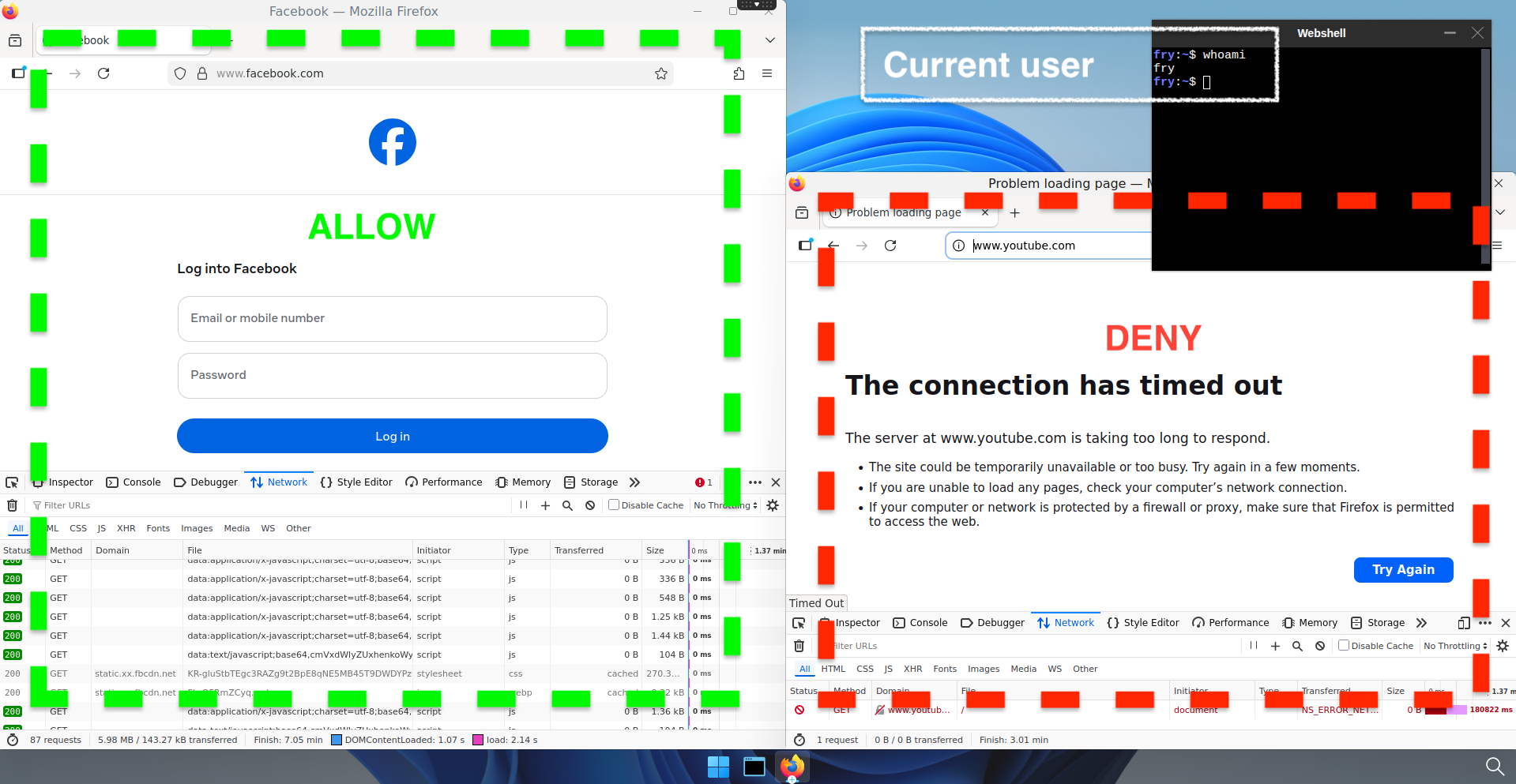
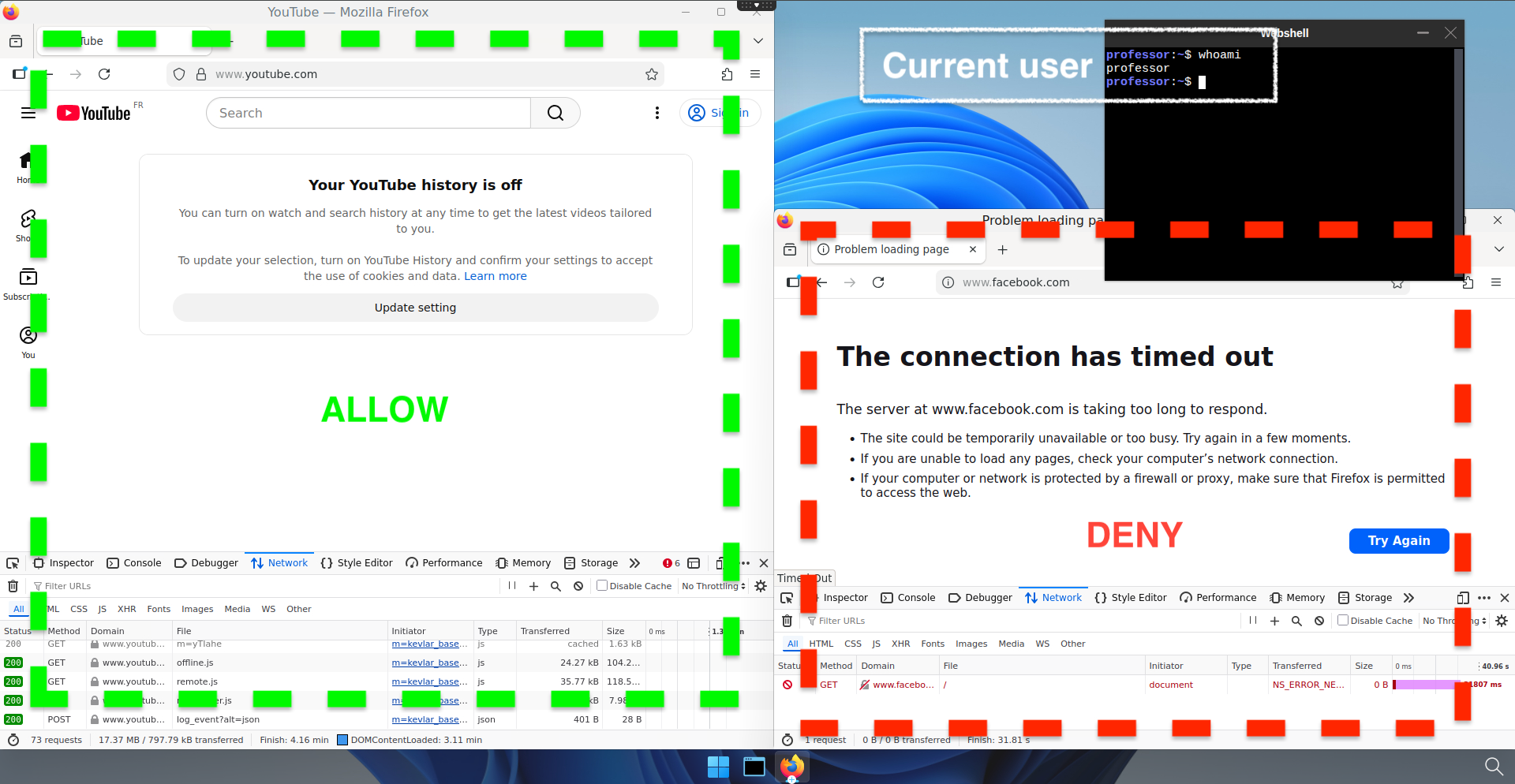
Let's see if the policies has correctly been applied. Log on both pods an try to succesively connect to www.youtube.com and www.facebook.com.
-
First test : Facebook allowed, rest is denied :
-
Second test : Youtube allowed, rest is denied :
Why This Matters
Default-Deny: Cilium policies operate on an allowlist basis. Once you apply a rule, all traffic NOT explicitly permitted is blocked.
No Client Bypass: The filtering happens on the cluster network, not in the pod. Users can't disable it.
Scales Automatically: When you add a user to a new group in LDAP, their pod gets the label at next login. Policies apply immediately.
DNS-Based Rules: Instead of managing IP lists (which change constantly), you manage domain patterns. *.facebook.com covers all CDNs, all subdomains, automatically.
Common Use Cases
| Department | Access | Policy |
|---|---|---|
| Sales | CRM, Email, Google Meet | *.salesforce.com, *.google.com, *.slack.com |
| Finance | ERP, Banking, Accounting | *.sap.com, *.intacct.com, internal-banking-server |
| IT/Ops | All internal services | No policy (allow-all) or restricted list |
| Customer Service | Helpdesk, Email, Docs | *.zendesk.com, *.google.com |
Next Steps
- Create your group structure in LDAP — Organize teams by department or role
- Test with a small pilot group — Apply policies to one group, verify behavior
- Scale across the organization — Create policies for each department
- Monitor and audit — Use Cilium's built-in observability to see what's being blocked
Resources
Back to Use Cases: Use Cases | Kubernetes VDI