Build an application from a template
Goal: Build a custom abcdesktop.io application image by extending an existing template container image.
abcdesktop.io uses the container image format with metadata labels to describe each application.
Requirements
- Your own public or private container registry.
nodejsinstalled on your host.dockercommand-line tool installed to build container images.wgetcommand-line tool installed.
Build your own application image
In this example, the new application image packages the 2048 game. The build process uses a JSON descriptor file and a Node.js script to generate a Dockerfile automatically.
Create a directory named build, and create a directory icons inside it:
mkdir -p build/icons
cd build
To build your own image, first create a JSON descriptor file that defines the application's metadata, package name, and runtime configuration.
Create a file named applist.json inside the build directory with the following content:
[
  {
    "cat": "games",
    "debpackage": "2048-qt",
    "icon": "2048_logo.svg",
    "keyword": "2048",
    "launch": "2048-qt.2048-qt",
    "name": "2048",
    "displayname": "2048",
    "path": "/usr/games/2048-qt",
    "template": "ghcr.io/abcdesktopio/oc.template.ubuntu.gtk.26.04"
  }
]
The table below describes each field in the JSON application descriptor:
| name | Type | Data |
|---|---|---|
cat |
string | games |
debpackage |
string | 2048-qt |
icon |
string | 2048_logo.svg |
keyword |
string | 2048 |
launch |
string | 2048-qt.2048-qt |
name |
string | 2048 |
path |
string | /usr/games/2048-qt |
template |
string | ghcr.io/abcdesktopio/oc.template.ubuntu.gtk.26.04 |
The following descriptions explain how to determine the correct value for each field:
catis the application category. Choose the most appropriate value from the following list:[ 'office', 'games', 'graphics', 'development', 'utilities', 'education' ]debpackageis the name of the Ubuntu package to install. To look up the correct package name, refer to 2048 Ubuntu Package.iconis the filename of the application icon. abcdesktop.io supports only thesvgicon format. Download the icon from https://upload.wikimedia.org/wikipedia/commons/1/18/2048_logo.svg.keywordis a comma-separated list of search keywords for the application. Set the value to2048.launchis the X11WM_CLASSidentifier of the application window. To determine this value, run the application on a GNU/Linux system and inspect its window class using a tool such asxprop.nameis the internal application name. Set the value to2048.pathis the absolute filesystem path to the application binary.templateis the name of the parent base image. The default parent image isghcr.io/abcdesktopio/oc.template.ubuntu.gtk.26.04. Available templates are listed in the next section.

Build your new image 2048
- Download the application icon
wget https://upload.wikimedia.org/wikipedia/commons/1/18/2048_logo.svg -O icons/2048_logo.svg
- Download the Node.js build scripts
wget https://raw.githubusercontent.com/abcdesktopio/oc.apps/refs/heads/4.4/make.js
wget https://raw.githubusercontent.com/abcdesktopio/oc.apps/refs/heads/4.4/package.json
Run npm install to install the required packages:
npm i
- Run
make.jsto generate a Dockerfile for the 2048 application. The script readsapplist.jsonand produces a ready-to-build Dockerfile for each entry.
nodejs make.js
The expected output is:
Namespace(dockerfile=false, release='4.4', applicationfile='applist.json')
Read database json file=applist.json
opening file applist.json
applist.json entries: 1
Creating Dockerfile 2048.d
The following file has been generated:
2048.d— the generated Dockerfile for the 2048 abcdesktop.io application
Inspect the content of 2048.d. Verify that all required labels are present and that the icon data is base64-encoded (a binary-to-text encoding scheme used to embed binary assets in text files).
Build the 2048 application image using the docker build command.
Replace the value of
REGISTRYwith your own registry name if needed.
REGISTRY=abcdesktopio
docker build -f 2048.d -t $REGISTRY/2048.d .
The expected output is:
[+] Building 62.3s (8/8) FINISHED                                                                                                                                                           docker:default
 => [internal] load build definition from 2048.d                                                                                                                                                      0.0s
 => => transferring dockerfile: 3.49kB                                                                                                                                                                0.0s
 => [internal] load metadata for ghcr.io/abcdesktopio/oc.template.ubuntu.gtk.26.04:4.4                                                                                                                                                                                0.0s
 => [internal] load .dockerignore                                                                                                                                                                     0.0s
 => => transferring context: 2B                                                                                                                                                                       0.0s
 => CACHED [1/4] FROM ghcr.io/abcdesktopio/oc.template.ubuntu.gtk.26.04:4.4                                                                                                                           0.0s
 => [2/4] RUN echo 'debconf debconf/frontend select Noninteractive' | debconf-set-selections                                                                                                          0.3s
 => [3/4] RUN DEBIAN_FRONTEND=noninteractive apt-get update && apt-get install -y  --no-install-recommends 2048-qt && apt-get clean && rm -rf /var/lib/apt/lists/*                                   59.9s
 => [4/4] RUN if [ -x /usr/bin/dbus-launch ]; then chmod g+r,g+w,o+r,o+w /var/lib/dbus ; fi                                                                                                           0.2s
 => exporting to image                                                                                                                                                                                1.8s
 => => exporting layers                                                                                                                                                                               1.8s
 => => writing image sha256:7804b6c77950a0f43daa13b7b0901eb4b795f984c6d888ab6ef513573b4d3147                                                                                                          0.0s
 => => naming to docker.io/abcdesktop/2048.d
- Push your image to your registry
Replace the value of
REGISTRYwith your own registry name if needed. If you do not have your own registry, you can skip this step but keepREGISTRY=abcdesktopio.
REGISTRY=abcdesktopio
docker push $REGISTRY/2048.d
- Create a JSON file from your container image
If you do not have your own registry, do not skip this step. Keep
REGISTRY=abcdesktopio.
REGISTRY=abcdesktopio
docker inspect $REGISTRY/2048.d > 2048.json
Push your image to abcdesktop service
- Send the image metadata to the abcdesktop pyos instance
NAMESPACE=abcdesktop
PYOS_POD_NAME=$(kubectl get pods -l run=pyos-od -o jsonpath={.items..metadata.name} -n "$NAMESPACE" | awk '{print $1}')
kubectl cp 2048.json $PYOS_POD_NAME:/tmp -n $NAMESPACE
kubectl exec -i $PYOS_POD_NAME -n abcdesktop -- curl -X POST -H 'Content-Type: text/javascript' http://localhost:8000/API/manager/image -d @/tmp/2048.json
These commands retrieve the PYOS_POD name, copy the 2048.json file to the /tmp directory inside the pyos pod, and submit the file to the REST API server.
The image endpoint returns a JSON document
[
  {
    "cmd": [
      "/composer/appli-docker-entrypoint.sh"
    ],
    "path": "/usr/games/2048-qt",
    "sha_id": "sha256:7804b6c77950a0f43daa13b7b0901eb4b795f984c6d888ab6ef513573b4d3147",
    "id": "abcdesktop/2048.d:latest",
    "architecture": "amd64",
    "os": "linux",
    "rules": {},
    "acl": {
      "permit": [
        "all"
      ]
    },
    "launch": "2048-qt.2048-qt",
    "wm_class": null,
    "name": "2048",
    "icon": "2048_logo.svg",
    "icondata": "PD94bWwgdmVyc2lvbj0iMS4wIiBlbmNvZGluZz0iVVRGLTgiIHN0YW5kYWxvbmU9Im5vIj8+CjxzdmcgeG1sbnM9Imh0dHA6Ly93d3cudzMub3JnLzIwMDAvc3ZnIiB3aWR0aD0iMzAwIiBoZWlnaHQ9IjMwMCI+CiAgPHJlY3Qgd2lkdGg9IjMwMCIgaGVpZ2h0PSIzMDAiIGZpbGw9IiNlZGM1M2YiIHJ5PSI0Ni44MTIiLz4KICA8cGF0aCBmaWxsPSIjZmZmIiBmaWxsLW9wYWNpdHk9Ii45NDExOCIgZD0iTTkwLjQ5NCAxODAuMkg0Ni44Njl2LTkuOTI5NWM3LjgyMzgtNy44MjIzIDMwLjQ3NC0yNS40MDkgMjguMTUtMzUuNTMtMy4wNzIxLTkuNjg4OC0xNi41MTYtMy4xMDQxLTE4LjQ5NyAxLjMxNzlsLTkuNjA2LTcuMzRjOS45MDUxLTE1LjI3NyA0MC41NDgtMTMuNTE3IDQxLjQxOCA2LjE2MDguMTM0MTcgMTUuNTUzLTE1LjMyOCAyNS4wOS0yNC4zNDQgMzMuNjY4di41OTUzNmgyNi41MDR6bTU1LjE5Ni0zMC4wOGMuMDYzMSAxNy45MzQtNS4xMTQ2IDMxLjQ4NS0yMy4wMjcgMzEuNi0xOS4wODMtLjAzNTYtMjMuNTYtMTMuNzQzLTIzLjQ5NS0zMS40ODgtLjA2NDktMTcuNzggNC43ODEzLTMxLjU4IDIzLjQ5NS0zMS42MTQgMTguMDY2LjAzMzUgMjIuOTY0IDEzLjg1NCAyMy4wMjcgMzEuNTAyem0tMzMuNzM0LjExMjM2Yy4xMTU1NSA3LjAyNjYuNjc1OTkgMjAuNjE0IDEwLjQ4MyAyMC43MTEgOS43MDUzLjExMTY0IDEwLjUxMy0xNC4zODYgMTAuNTM4LTIwLjgyMy0uMTI2ODMtNi45OTEtLjQ4Nzc5LTIwLjUwMi0xMC40MjYtMjAuNTctMTAuMDk4LS4xODQxMi0xMC41MjggMTMuOTYzLTEwLjU5NSAyMC42ODJ6TTIzMS43MSAxMTguNjFjOC41MjQ1LjA0NTMgMjAuNDUgMy43MjU1IDIwLjQ1OSAxNC44MDMtLjAwOSA4Ljc1OC0zLjY0OTggMTAuNzI5LTEwLjY0IDE0LjU0OCA3LjY5NSA0LjY0NTMgMTIuNTM0IDguMTExMiAxMi42MjMgMTcuMjQxLS4wODkyIDExLjk1Ni0xMS42NTIgMTYuMjcxLTIyLjQ0MyAxNi4zNTEtMTEuMzYzLS4wNzk5LTIyLjU3LTQuMTM0Ni0yMi43NDQtMTYuNTIzLjE3ODk0LTguOTM3NiA1LjQxOTYtMTQuMDAxIDExLjEwMy0xNi44NjEtNi40OTA5LTMuOTgwNi05LjUzMzMtNi4wMzY0LTkuMzczMS0xNC44NC0uMTYwMi0xMC45MDcgMTEuODE3LTE0LjY3MyAyMS4wMTQtMTQuNzE5em0tMTAuNTM0IDQ1LjM0N2MtLjA0MzIgNS42ODM5IDQuNjk2MyA3Ljc0MzYgMTAuNDEgNy42OTU0IDUuNTA0OS4wNDgyIDkuNjcxOS0yLjI0NTMgOS43Mzk5LTcuMTY3NC4wNDc5LTguMjY2Ny05LjczNDQtMTEuODc5LTkuNzM0NC0xMS44NzlzLTEwLjQ1OSAzLjYxMjYtMTAuNDE2IDExLjM1MXptMTAuNDQxLTM0Ljk4MmMtNC43OTc5LS4wNDA5LTkuMTUxMiAxLjAzOTgtOS4xNzM5IDUuNjc3LjAyMjcgNS4zOTk1IDkuMDc3NCA5LjEwNCA5LjA3NzQgOS4xMDRzOC4zMzExLTMuNjU0NCA4LjQ1OTQtOS40ODQ3Yy0uMTkxOC00LjI1MjYtMy44MDg2LTUuMzM3Mi04LjM2MjktNS4yOTYzek0yMDIuMjIgMTcwLjA3aC03Ljc3djEwLjA4OGgtMTEuNTF2LTEwLjA4aC0zMC4wNnYtMTEuMTM3bDI5LjMzMi0zOC44NTNoMTIuMjM4djM5Ljc3Nmg3Ljc3em0tMTkuMjgtMzMuNzIzLTE4LjAzOCAyMy41MTdoMTguMDM4eiIvPgo8L3N2Zz4K",
    "keyword": "2048,2048",
    "uniquerunkey": null,
    "cat": "games",
    "args": null,
    "execmode": null,
    "showinview": null,
    "displayname": "2048",
    "desktopfile": null,
    "executeclassname": null,
    "runtimeClassName": null,
    "executablefilename": "2048-qt",
    "usedefaultapplication": false,
    "mimetype": [],
    "fileextensions": [],
    "legacyfileextensions": [],
    "secrets_requirement": null,
    "containerengine": "ephemeral_container",
    "securitycontext": {},
    "created": "2026-04-08T17:02:15.742581671+02:00"
  }
]
Run your new application 2048
Return to your abcdesktop website at http://localhost:30443 and log in as Anonymous.
In the search bar at the top-right corner, type the keyword 2048.
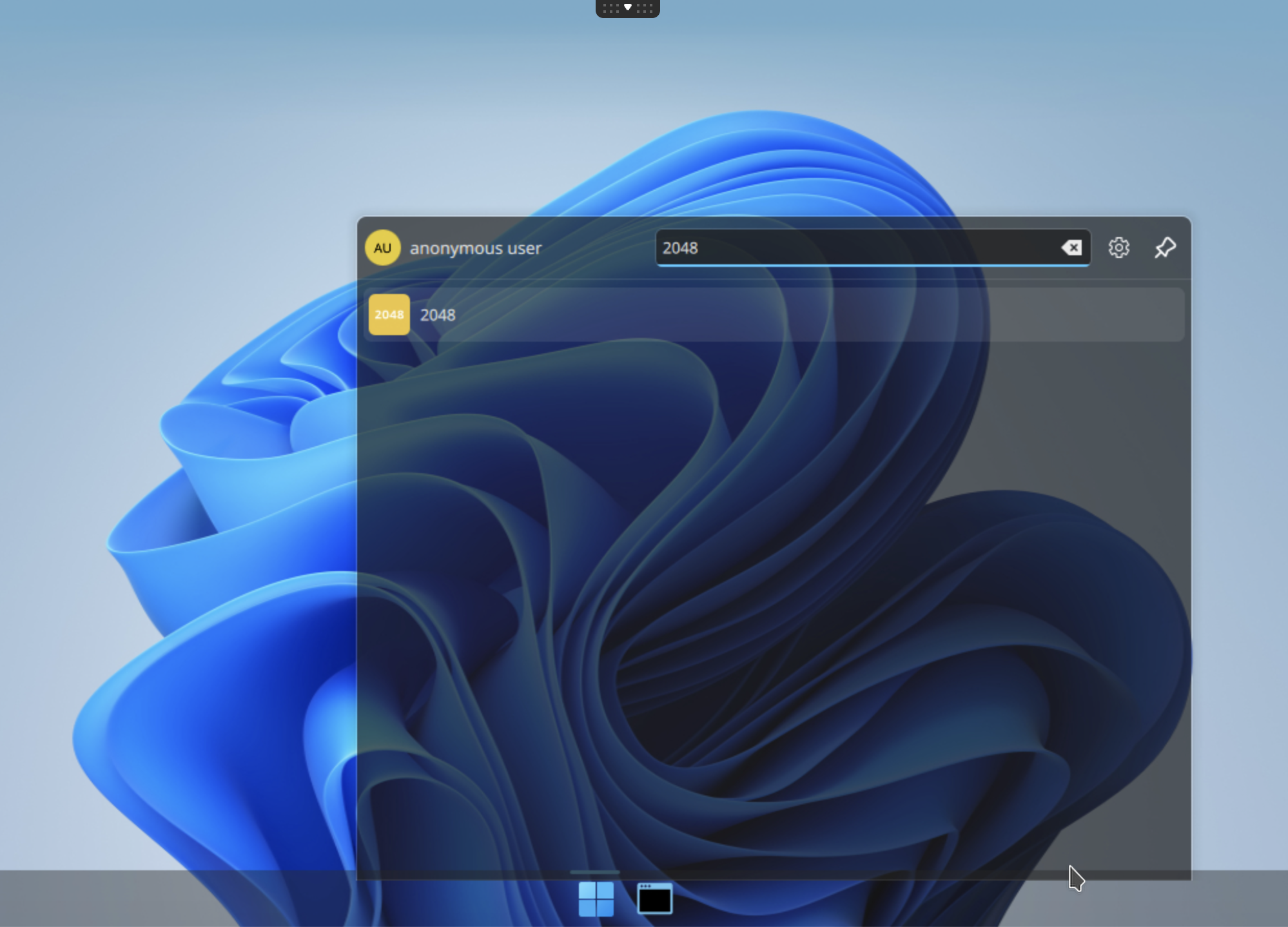
Click the 2048 icon to launch the application:
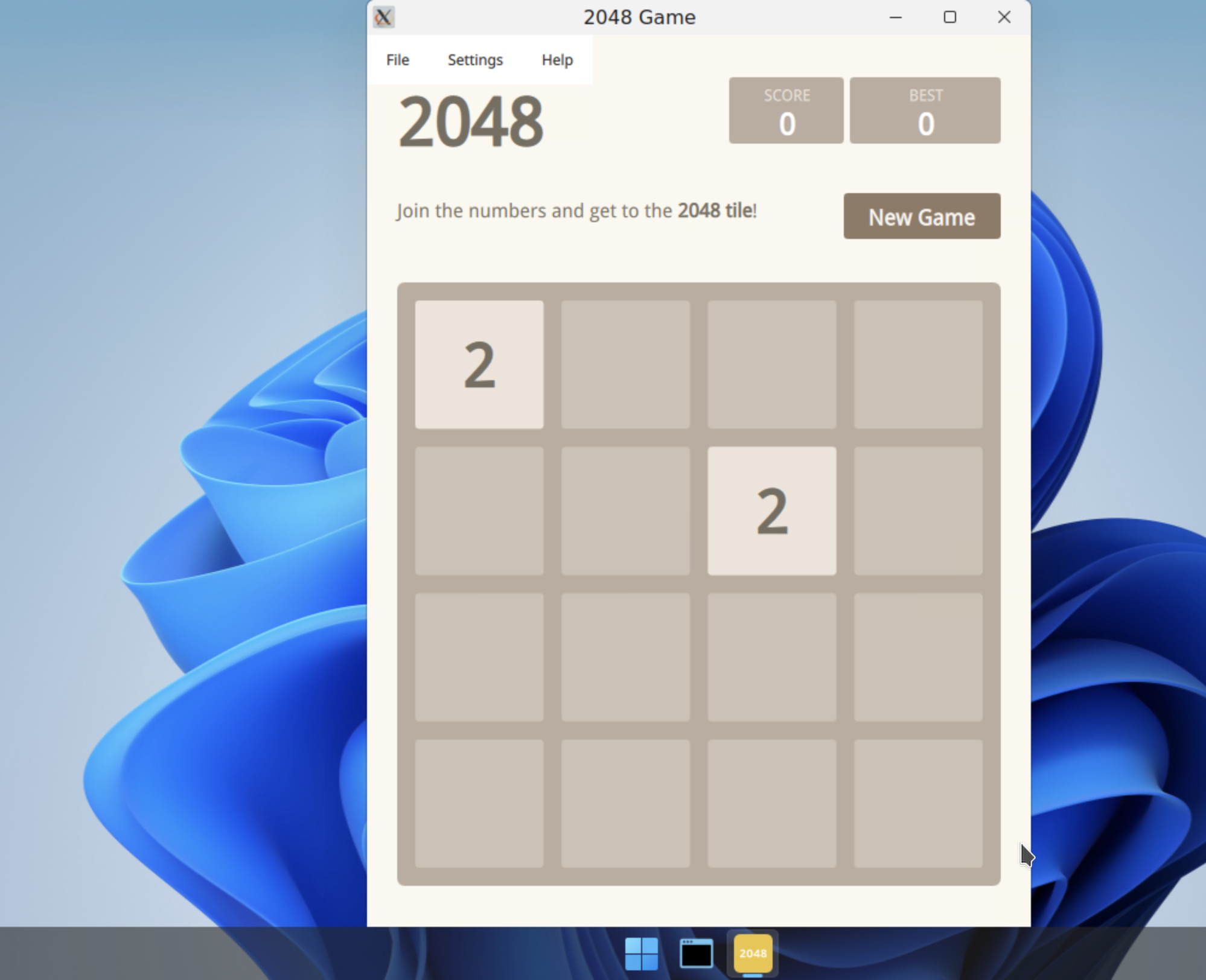
The application is now running as an ephemeral container inside your abcdesktop.io user pod. Have fun!
Other templates
Because each application runs inside its own dedicated container, you can run applications from multiple Linux distributions simultaneously on the same abcdesktop.io instance. The full template repository is available at https://github.com/abcdesktopio/oc.template.
templates for almalinux
- oc.template.almalinux.8
- oc.template.almalinux.9
- oc.template.almalinux.10
- oc.template.almalinux.gtk.8
- oc.template.almalinux.gtk.10
- oc.template.almalinux.gtk.9
- oc.template.almalinux.minimal.9
- oc.template.almalinux.minimal.10
templates for alpine
- oc.template.alpine.edge
- oc.template.alpine
- oc.template.alpine.wine
- oc.template.alpine.edge.gtk
- oc.template.alpine.edge.gtk.libreoffice
- oc.template.alpine.libreoffice
- oc.template.alpine.3.23
- oc.template.alpine.minimal.3.20
- oc.template.alpine.minimal.3.21
- oc.template.alpine.minimal.3.22
- oc.template.alpine.minimal.3.23
- oc.template.alpine.minimal.edge
- oc.template.alpine.minimal
templates for debian
- oc.template.debian.gtk
- oc.template.debian
- oc.template.debian.minimal
templates for ubuntu
- oc.template.ubuntu.minimal.20.04
- oc.template.ubuntu.minimal.22.04
- oc.template.ubuntu.minimal.24.04
- oc.template.ubuntu.minimal.26.04
- oc.template.ubuntu.gtk.18.04
- oc.template.ubuntu.18.04
- oc.template.ubuntu.minimal.18.04
- oc.template.ubuntu.24.04
- oc.template.ubuntu.20.04
- oc.template.ubuntu.22.04
- oc.template.ubuntu.26.04
- oc.template.ubuntu.wine.mswindow
- oc.template.ubuntu.libreoffice
- oc.template.ubuntu.wine
- oc.template.ubuntu.gtk.java
- oc.template.ubuntu.gtk.24.04
- oc.template.ubuntu.gtk.22.04
- oc.template.ubuntu.gtk.20.04
- oc.template.ubuntu.gtk.26.04
templates for rockylinux
- oc.template.rockylinux.gtk.libreoffice.9
- oc.template.rockylinux.gtk.9
- oc.template.rockylinux.gtk.8
- oc.template.rockylinux.8
- oc.template.rockylinux.9
- oc.template.rockylinux.minimal.8
- oc.template.rockylinux.minimal.9
Templates with nvidia library support
- oc.template.rockylinux.nvidia.8
- oc.template.rockylinux.nvidia.9
- oc.template.ubuntu.nvidia.24.04
- oc.template.ubuntu.nvidia.22.04
You have successfully built your own abcdesktop.io 2048 application.