Authentication: external
Prerequisites
The external authentication provider requires a fully qualified domain name (FQDN) and HTTPS connectivity. OAuth 2.0 redirect URIs must use the https:// scheme, as most OAuth 2.0 providers reject plaintext redirect URIs.
Library
abcdesktop.io uses the requests_oauthlib Python module to implement OAuth 2.0 authorization code flows. The requests-oauthlib library combines the Python requests HTTP client with the oauthlib standards-compliant OAuth 2.0 implementation, providing a unified interface for interacting with OAuth 2.0 providers.
Configuration
The external authentication provider is configured as a dictionary that maps provider names to their respective OAuth 2.0 settings. Each entry represents an independent OAuth 2.0 identity provider.
The following example shows a provider configuration for Google OAuth 2.0:
'external': {
  'providers': {
    'google': {
        'icon': 'img/auth/google_icon.svg',
        'displayname': 'Google',
        'textcolor': '#000000',
        'backgroundcolor': '#FFFFFF',
        'enabled': True,
        'client_id': 'xxxx',
        'client_secret': 'xxxx',
        'userinfo_auth': True,
        'scope': [ 'https://www.googleapis.com/auth/userinfo.email',  'openid' ],
        'userinfo_url': 'https://www.googleapis.com/oauth2/v1/userinfo',
        'redirect_uri_prefix' : 'https://hostname.domain.local/API/auth/oauth',
        'redirect_uri_querystring': 'manager=external&provider=google',
        'authorization_base_url': 'https://accounts.google.com/o/oauth2/v2/auth',
        'token_url': 'https://oauth2.googleapis.com/token',
        'policies': {
          'acl': { 'permit': [ 'all' ] }
        }
      }
  }}
client_idandclient_secretare set to the placeholder value'xxxx'. Replace these with the actual OAuth 2.0 credentials issued by the identity provider.redirect_uri_prefixmust reflect your server's actual FQDN. Replacehostname.domain.localwith the FQDN assigned to your deployment.
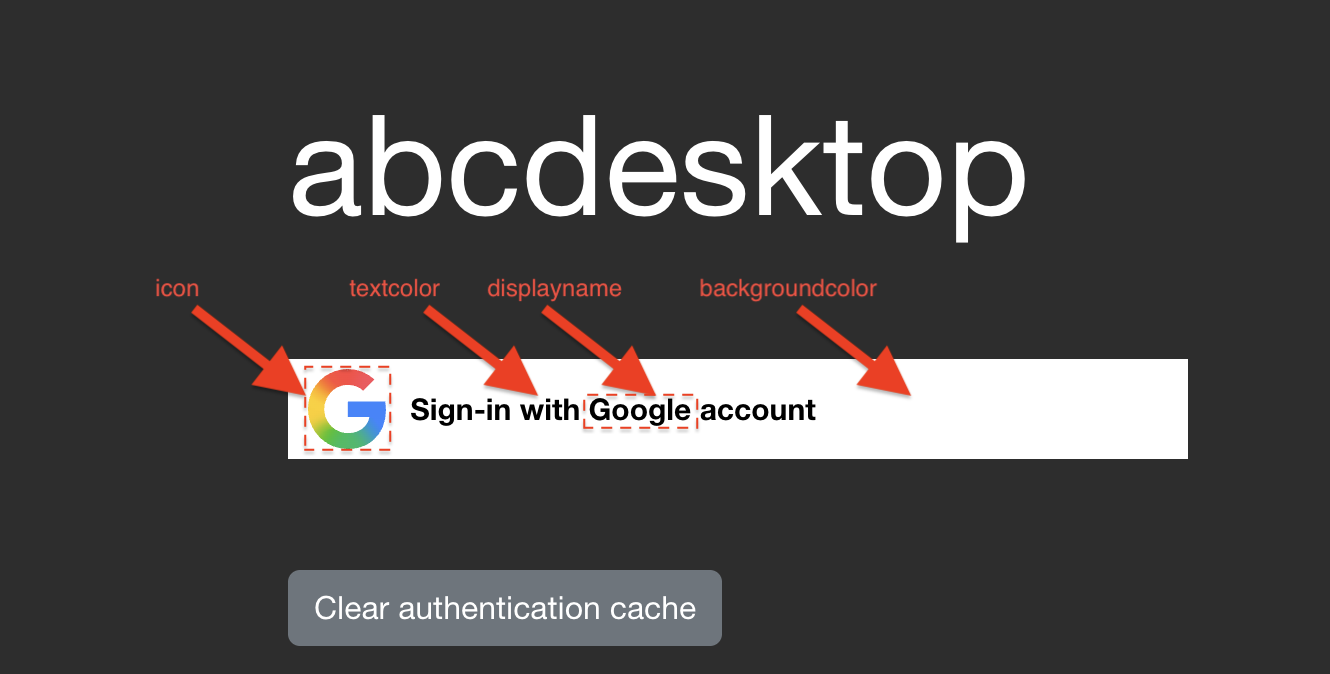
The configuration above renders the following login area on the web frontend:
Parameter Reference
| Parameter | Type | Description | Example |
|---|---|---|---|
displayname |
string | Display name shown on the login page | Google |
icon |
string | Path to the provider icon (SVG format required) | 'img/auth/google_icon.svg' |
textcolor |
string | Button text color (CSS hex) | '#000000' |
backgroundcolor |
string | Button background color (CSS hex) | '#FFFFFF' |
enabled |
boolean | Enables or disables this provider | True |
client_id |
string | OAuth 2.0 client ID | XXX-YYY.apps.googleusercontent.com |
client_secret |
string | OAuth 2.0 client secret | XXX |
scope |
list of string | OAuth 2.0 scopes to request | [ 'https://www.googleapis.com/auth/userinfo.email', 'openid' ] |
userinfo_auth |
boolean | Enables the OAuth userinfo endpoint request. Default: True. |
True |
userinfo_url |
string | URL of the OAuth 2.0 userinfo endpoint | 'https://www.googleapis.com/oauth2/v1/userinfo' |
redirect_uri_prefix |
string | Base URL for the OAuth 2.0 redirect URI | 'https://hostname.domain.local/API/auth/oauth' |
redirect_uri_querystring |
string | Query string appended to the redirect URI | 'manager=external&provider=google' |
authorization_base_url |
string | OAuth 2.0 authorization endpoint | 'https://accounts.google.com/o/oauth2/v2/auth' |
token_url |
string | OAuth 2.0 token endpoint | 'https://oauth2.googleapis.com/token' |
userinfomap |
dictionary | Remaps keys in the userinfo JSON response | { '*': '*', 'picture': 'picture.data.url' } |
policies |
dict | Access control policies. Default: {}. |
{ 'acl' : { 'permit': [ 'all' ] } } |
The full redirect URI is constructed by concatenating redirect_uri_prefix and redirect_uri_querystring.
The userinfomap applies to all fields in [ 'userid', 'name' ] and to the POSIX account fields [ 'cn', 'uid', 'gid', 'uidNumber', 'gidNumber', 'homeDirectory', 'loginShell', 'description', 'groups', 'gecos' ].
Reading Groups and Assigning Roles from userinfo
If userinfo_auth is True, abcdesktop.io retrieves the JSON body from the userinfo_url endpoint. If the response contains a groups key whose value is a list of strings, each string is applied as a role label on the user's pod:
     if isinstance( userinfo.get('groups'), list ):
            for role in userinfo.get('groups'):
                if isinstance(role, str):
                    roles.append(role)
For example, if the userinfo endpoint returns:
{
    "id": "34567345623452",
    "email": "mail@yourdomain.com",
    "verified_email": true,
    "picture": "https://lh3.googleusercontent.com/x-/xxxxxxxxxxxx",
    "hd": "yourdomain.com",
    "groups": [ "admins", "developers" ]
}
The user pod receives the labels admins=true and developers=true:
kubectl describe pods user-746b8   -n abcdesktop
...
Labels:           abcdesktop/role=desktop
                  admins=true
                  developers=true
                  ...
Google OAuth 2.0
Create a Google OAuth 2.0 client credential in the Google Cloud Console and configure the provider:
'google': {
        'icon': 'img/auth/google_icon.svg',
        'displayname': 'Google',
        'textcolor': '#000000',
        'backgroundcolor': '#FFFFFF',
        'enabled': True,
        'client_id': 'xxxx',
        'client_secret': 'xxxx',
        'userinfo_auth': True,
        'scope': [ 'https://www.googleapis.com/auth/userinfo.email',  'openid' ],
        'userinfo_url': 'https://www.googleapis.com/oauth2/v1/userinfo',
        'redirect_uri_prefix' : 'https://hostname.domain.local/API/auth/oauth',
        'redirect_uri_querystring': 'manager=external&provider=google',
        'authorization_base_url': 'https://accounts.google.com/o/oauth2/v2/auth',
        'token_url': 'https://oauth2.googleapis.com/token',
        'policies': { 'acl'  : { 'permit': [ 'all' ] } }
      }
Facebook OAuth 2.0
Create a Facebook application in the Meta Developer Portal and use the generated credentials to configure the provider:
'facebook': {
        'displayname': 'Facebook',
        'icon': 'img/auth/facebook_icon.svg',
        'textcolor': '#000000',
        'backgroundcolor': '#FFFFFF',
        'enabled': True,
        'userinfo_auth': True,
        'client_id': 'xxxx',
        'client_secret': 'xxxx',
        'redirect_uri_prefix' : 'https://ocv4.pepins.net/API/auth/oauth',
        'redirect_uri_querystring': 'manager=external&provider=facebook',
        'authorization_base_url': 'https://www.facebook.com/dialog/oauth',
        'userinfo_url': 'https://graph.facebook.com/v2.6/me?fields=picture.width(400),name',
        'token_url': 'https://graph.facebook.com/v2.3/oauth/access_token',
        'userinfomap': {
            '*': '*',
            'picture': 'picture.data.url'
        },
        'policies': { 'acl'  : { 'permit': [ 'all' ] } }
      }
In this example, userinfomap remaps the picture key in the userinfo JSON response to the nested value at picture.data.url.
Orange OAuth 2.0 / OpenID Connect
Orange's OAuth 2.0 API is built on the OpenID Connect protocol. Create your Orange application credentials and configure the provider:
 'orange': {
        'displayname': 'Orange',
        'icon': 'img/auth/orange_icon.svg',
        'textcolor': '#000000',
        'backgroundcolor': '#FFFFFF',
        'enabled': True,
        'basic_auth': True,
        'userinfo_auth': True,
        'scope' : [ 'openid', 'form_filling' ],
        'client_id': 'xxxx',
        'client_secret': 'xxxx',
        'redirect_uri_prefix' : 'https://hostname.domain.local/API/auth/oauth',
        'redirect_uri_querystring': 'manager=external&provider=orange',
        'authorization_base_url': 'https://api.orange.com/openidconnect/fr/v1/authorize',
        'token_url': 'https://api.orange.com/openidconnect/fr/v1/token',
        'userinfo_url': 'https://api.orange.com/formfilling/fr/v1/userinfo',
        'policies': { 'acl'  : { 'permit': [ 'all' ] } }
      },