title: Filter Pod Network Traffic by User Group | abcdesktop.io description: Use case: configure abcdesktop.io rules and Kubernetes NetworkPolicy objects to restrict outbound pod traffic based on LDAP group membership. keywords: network traffic, group, LDAP, NetworkPolicy, allowlist, default-deny, abcdesktop, Kubernetes, security, use case tags: - use case - NetworkPolicy - LDAP - security
Filter traffic based on user's groups
Prerequisites
- a Kubernetes cluster with abcdesktop installed
- use cilium as network provider for your cluster
- An authentication provider with groups support (
LDAP,ActiveDirectoryorOAuth), see authentication section for more details. By default the docker-test-openldap provides groups support.
Note
In this example, we will use docker-test-openldap which is a LDAP service
Use case description
As an organization, you may have multiple departments—such as sales, accounting, and IT—each with different access requirements. For example, an IT employee should not have access to accounting documents. With abcdesktop, you can address these requirements by creating rules based on the groups to which users belong.
---
config:
  theme: redux-color
---
sequenceDiagram
    actor Philip
    Philip->>Router: Logme in (Philip, password)
    Router->>Pyos: Logme in (Philip, password)
    Note over Router,Pyos: 1. Authentication
    Create participant LDAP
    Pyos->>LDAP: BIND LDAP_SEARCH Philip
    destroy LDAP
    LDAP->>Pyos: dn, cn, group=shipcrew
    Note right of Kubernetes: Cilium Policy
    Pyos->>Kubernetes: (option) Create user secrets
    Kubernetes->>Pyos: (option) Secrets created
    Pyos->>Router: User Philip JWT
    Router->>Philip: User Philip JWT
    Philip->>Router: Create Desktop (User Philip JWT)
    Note over Router,Pyos: 2. Create a desktop
    Router->>Pyos: Create Desktop (User Philip JWT)
    Pyos->>Kubernetes: Create Philip POD YAML
    Kubernetes->>Pyos: POD Created
    Create participant PodPhilip
    Note right of PodPhilip: shipcrew=true
    Kubernetes->>PodPhilip:
    destroy Kubernetes
    Kubernetes->>Pyos: Philip Pod is Ready
    destroy Pyos
    Pyos->>Router: Desktop Philip JWT
    Router->>Philip: Desktop Philip JWT
    Router->>Philip: Connected
    Create participant Facebook
    PodPhilip->>Facebook: Access Granted #10004;
    destroy Facebook
    Facebook->>PodPhilip: OK
    Philip-->PodPhilip: Established
    Create participant Youtube
    PodPhilip--xYoutube: Drop #10006;
How does abcdesktop manage groups
Assume that users registered in your authentication system are already assigned to groups. In this example, Philip J. Fry (known as fry) and Hubert J. Farnsworth (known as professor) are members of the ship_crew and admin_staff groups, respectively (cf https://github.com/rroemhild/docker-test-openldap).
Once authenticated, the abcdesktop control plane reads the user's information and creates the user pod with the user's group memberships applied as pod labels.
kubectl get pods -n abcdesktop
NAME                            READY   STATUS    RESTARTS      AGE
console-od-7f548d74fd-48rpv     1/1     Running   0             2d19h
fry-3c9e8                       3/3     Running   0             45h
memcached-od-796c455cd-hqhlb    1/1     Running   0             2d19h
mongodb-od-0                    2/2     Running   0             2d19h
nginx-od-6657dd8c9-c979g        1/1     Running   0             2d19h
openldap-od-6f4797f9d-86jdd     1/1     Running   0             2d1h
professor-0ecf4                 3/3     Running   0             44h
pyos-od-68776fb486-69x5q        1/1     Running   0             2d
router-od-867f5576dd-p9hj5      1/1     Running   0             2d19h
speedtest-od-78cdbdd9c6-vphfl   1/1     Running   0             2d19h
Run the kubectl describe pod command on each user pod to verify that the group labels are present.
show details
kubectl describe pod fry-3c9e8 -n abcdesktop
[...]
Labels:         abcdesktop/role=desktop
                access_provider=planet
                access_providertype=ldap
                access_userid=fry
                access_username=philip-j.-fry
                broadcast_cookie=202f5459d1a35e54d149b75795f269796cdd78c520e4e412
                cn-ship_crew-ou-people-dc-planetexpress-dc-com=
                ipsource=10.0.2.216
                labeltrue=true
                netpol/ocuser=true
                pulseaudio_cookie=8d8cec68f8647887efdcd1bddb09db6a
                service_broadcast=29784
                service_ephemeral_container=enabled
                service_filer=29783
                service_graphical=6081
                service_init=enabled
                service_pod_application=enabled
                service_printerfile=29782
                service_sound=29788
                service_spawner=29786
                service_webshell=29781
                shipcrew=true
                type=x11server
                xauthkey=2d1afb247f156987dc65ae72bcc0f4
[...]
kubectl describe pod professor-0ecf4 -n abcdesktop
[...]
Labels:         abcdesktop/role=desktop
                access_provider=planet
                access_providertype=ldap
                access_userid=professor
                access_username=hubert-j.-farnsworth
                adminstaff=true
                broadcast_cookie=315066f64d9c59b70ce5f0c7d86f10079b01a78cce44d8c7
                cn-admin_staff-ou-people-dc-planetexpress-dc-com=
                ipsource=10.0.1.22
                labeltrue=true
                netpol/ocuser=true
                pulseaudio_cookie=b8c096a27cad70c114ed81ab4c4da3a1
                service_broadcast=29784
                service_ephemeral_container=enabled
                service_filer=29783
                service_graphical=6081
                service_init=enabled
                service_pod_application=enabled
                service_printerfile=29782
                service_sound=29788
                service_spawner=29786
                service_webshell=29781
                type=x11server
                xauthkey=f7e335f429be8bd8e82c48df775fb0
[...]
Confirm that the label shipcrew=true appears on the fry pod and adminstaff=true appears on the professor pod.
Create access rules based on groups
To control incoming (ingress) and outgoing (egress) traffic for pods in Kubernetes, operators typically use NetworkPolicies. However, standard Kubernetes NetworkPolicy resources do not support filtering based on fully qualified domain names (FQDNs); they only support filtering by IP address or CIDR range. If the target service uses multiple IP addresses, each address must be listed explicitly in the policy—a significant maintenance burden, especially when addresses change dynamically. This is why Cilium is used as the cluster network provider: it supports CiliumNetworkPolicy resources, which extend the standard Kubernetes network policy API with additional capabilities not yet available natively, such as DNS-based egress filtering rules.
Warning
CiliumNetworkPolicy resources operate on an allowlist (default-deny) basis. Once an egress rule is applied to an endpoint, all traffic not explicitly permitted is denied.
In this example, users belonging to the shipcrew group are granted access to Facebook, and users in the adminstaff group are granted access to YouTube.
Create a file named netpol-allow-facebook-shipcrew.yaml with the following content.
apiVersion: cilium.io/v2
kind: CiliumNetworkPolicy
metadata:
  name: allow-facebook-shipcrew
  namespace: abcdesktop
spec:
  endpointSelector:
    matchLabels:
      shipcrew: "true" # Selector based on group label
  egress:
  - toEndpoints:
    # Allow all DNS resolutions
    - matchLabels:
       "k8s:io.kubernetes.pod.namespace": kube-system
       "k8s:k8s-app": kube-dns
    toPorts:
      - ports:
         - port: "53"
           protocol: ANY
        rules:
          dns:
            - matchPattern: "*"
  - toFQDNs:
      # Add here all the FQDN patterns you want to grant access to
      - matchPattern: "*.facebook.com"
      - matchPattern: "*.xx.fbcdn.net"
    toPorts:
      - ports:
         - port: "80"
           protocol: TCP
         - port: "443"
           protocol: TCP
Apply the policy to the cluster.
kubectl apply -f netpol-allow-facebook-shipcrew.yaml -n abcdesktop
ciliumnetworkpolicy.cilium.io/allow-facebook-shipcrew configured
Verify that the policy was created successfully.
kubectl get ciliumnetworkpolicy -n abcdesktop
NAME                       AGE
allow-facebook-shipcrew    27h
User pods belonging to the shipcrew group now have access to Facebook. All other external destinations remain blocked.
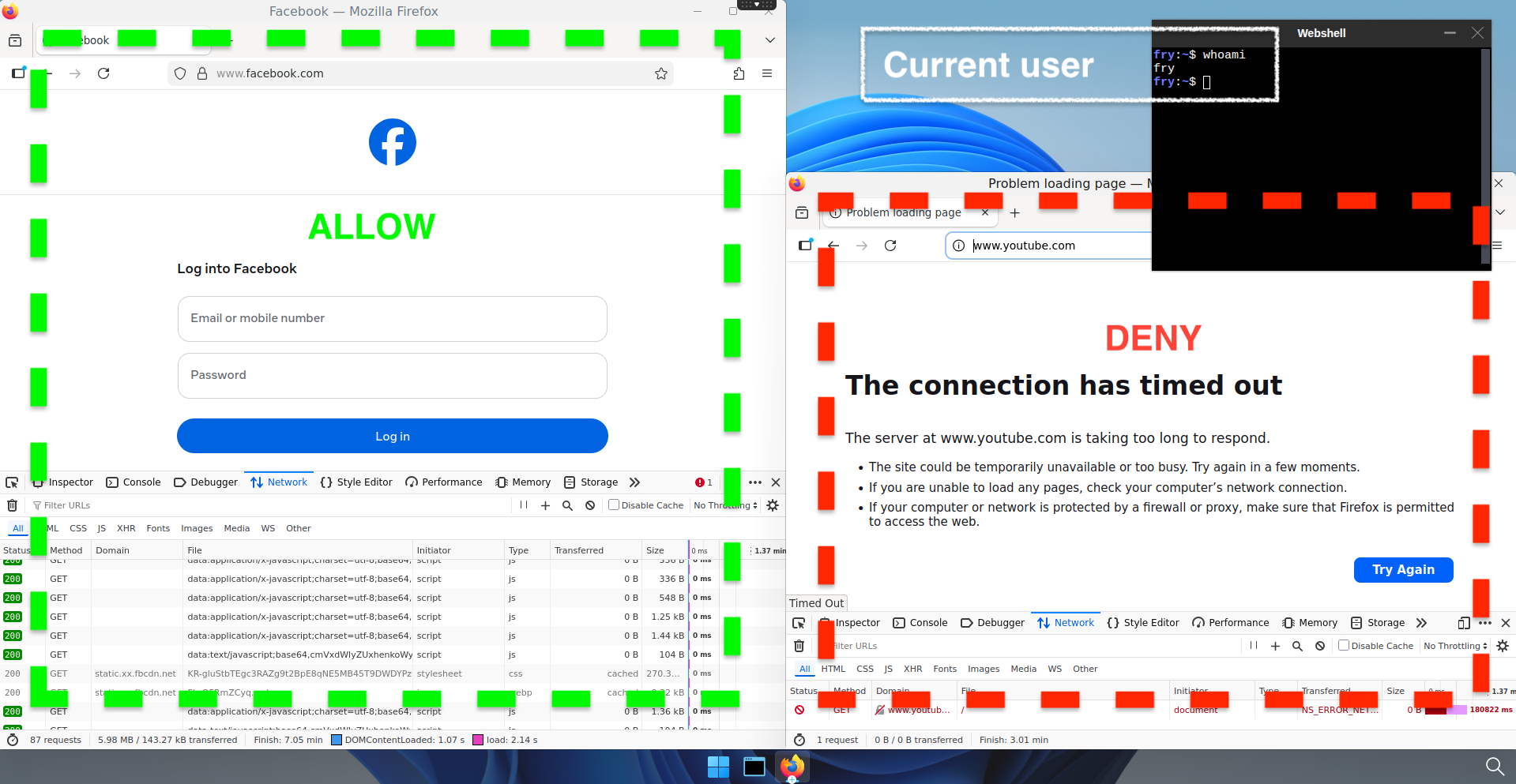
Create a file named netpol-allow-youtube-adminstaff.yaml with the following content.
apiVersion: cilium.io/v2
kind: CiliumNetworkPolicy
metadata:
  name: allow-youtube-adminstaff
  namespace: abcdesktop
spec:
  endpointSelector:
    matchLabels:
      adminstaff: "true" # Selector based on group label
  egress:
  - toEndpoints:
    # Allow all DNS resolutions
    - matchLabels:
       "k8s:io.kubernetes.pod.namespace": kube-system
       "k8s:k8s-app": kube-dns
    toPorts:
      - ports:
         - port: "53"
           protocol: ANY
        rules:
          dns:
            - matchPattern: "*"
  - toFQDNs:
      # Add here all the FQDN patterns you want to grant access to
      - matchPattern: "*.youtube.com"
    toPorts:
      - ports:
         - port: "80"
           protocol: TCP
         - port: "443"
           protocol: TCP
Apply the policy to the cluster.
kubectl apply -f netpol-allow-youtube-adminstaff.yaml -n abcdesktop
ciliumnetworkpolicy.cilium.io/allow-youtube-adminstaff configured
Verify that the policy was created successfully.
kubectl get ciliumnetworkpolicy -n abcdesktop
NAME                       AGE
allow-facebook-shipcrew    27h
allow-youtube-adminstaff   27h
User pods belonging to the adminstaff group now have access to YouTube. All other external destinations remain blocked.
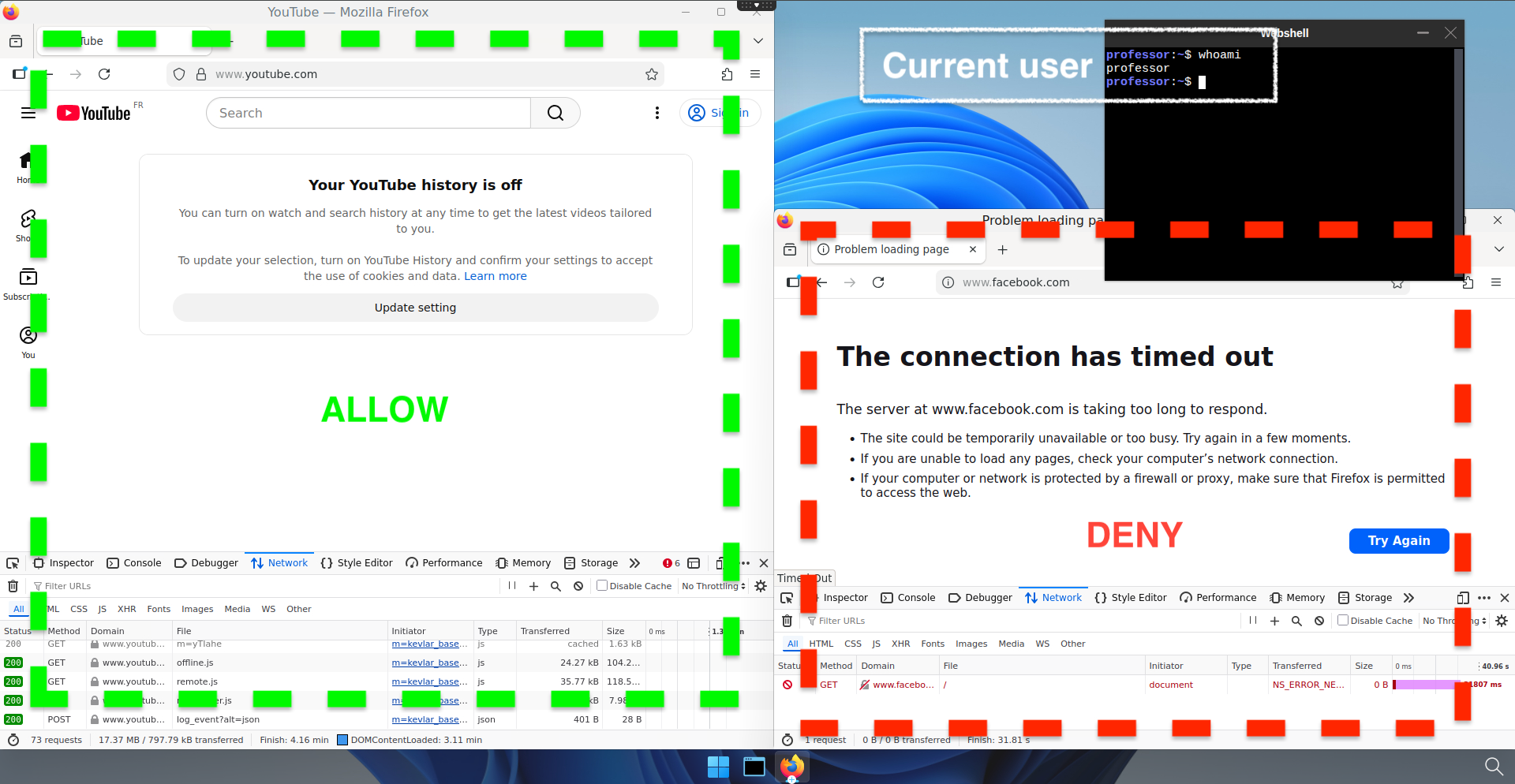
Network access is now controlled per user group using Cilium network policies.